

Cloud Project Management Explained – No More Rainy Days for Your Projects
Why Cloud Computing Project Management Is Changing Modern Business
Cloud computing project management is the practice of coordinating projects, teams, and resources on cloud-based platforms instead of traditional on-premise systems. This approach enables real-time collaboration, reduces costs, and provides the flexibility businesses need to stay competitive.
Key aspects of cloud computing project management:
- Real-time access – Team members can view project updates instantly from anywhere
- Cost efficiency – No expensive servers or maintenance required
- Scalability – Resources adjust automatically based on project needs
- Improved security – Centralized controls and automated updates
- Global collaboration – Teams work together regardless of location
The shift to globally accessible systems is essential for business survival. As one industry expert noted: “Of the multitudes of realizations that came out of the pandemic, one of them was that we can’t keep all our knowledge in our desks.”
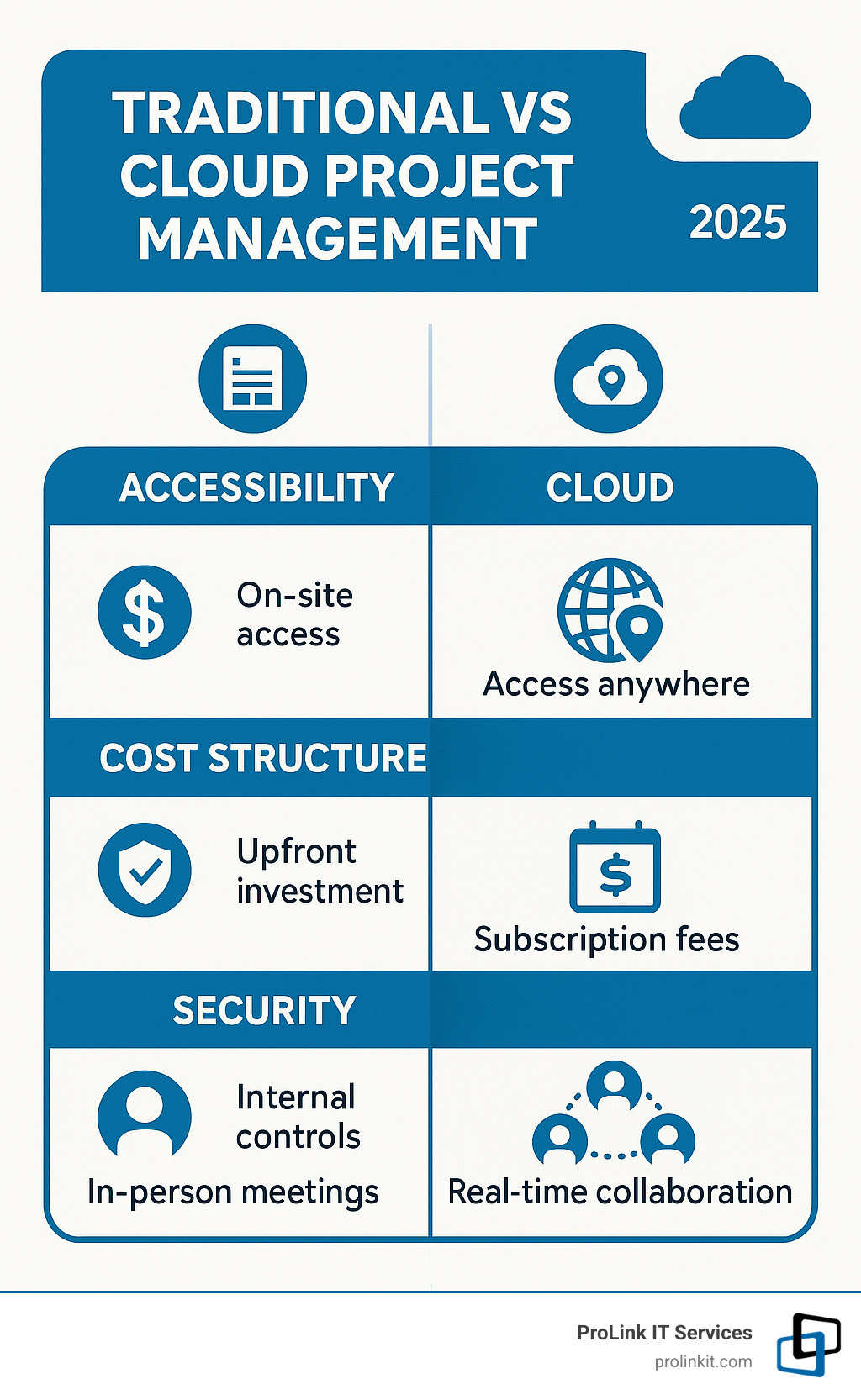
Traditional project management, with its physical servers and manual handoffs, created bottlenecks and made remote collaboration difficult. Cloud computing project management eliminates these barriers by centralizing operations in secure, digital environments.
This guide will walk you through the core benefits and methodologies for your business needs. I’m Mitch Johnson, founder and CEO of ProLink IT Services. With over 20 years of experience, I’ve seen how cloud computing project management transforms operations, reduces costs, and enables teams to work more effectively.
Handy cloud computing project management terms:
The Core Benefits: Why Move Your Project Management to the Cloud?
With cloud computing project management, your entire workspace is available anywhere, anytime. Instead of being tied to a specific computer, all project information lives in a secure digital space accessible to your team via the internet. This is a major shift from traditional methods that relied on clunky on-premise servers, manual handoffs, and version control nightmares. The cloud ensures your data is always current and accessible.

Opening up Seamless Collaboration and Remote Work
Cloud project management turns your team into a collaboration machine, regardless of location. With real-time data access, team members can work on the same project simultaneously without delays or confusion over file versions. This ability to work across different time zones is like having everyone in the same conference room.
Because geography is no longer a barrier, you can hire the best talent from anywhere. Cloud-based project management is essential for supporting remote work, which helps attract top talent and improve work-life balance by keeping everyone connected and productive.
Want to see how our solutions can transform your team’s collaboration? Check out more info about our cloud services.
Gaining Cost-Efficiency and Scalability
Traditional servers are expensive to buy, house, and maintain. Cloud computing project management uses a pay-as-you-go approach, eliminating massive upfront hardware costs. You pay only for the resources you use, providing significant financial flexibility.
Maintenance is handled by the cloud provider, freeing your team from dealing with server crashes or software patches. Scalability on demand is another key benefit. As your project needs change, you can adjust resources instantly without ordering new hardware. This allows your budget to scale predictably with your initiatives.
Enhancing Security and Productivity
Cloud environments are often more secure than traditional setups. Cloud providers invest millions in security, employing expert teams, using centralized security controls, and providing automated updates. They follow the principle of least privilege, ensuring users only access what they need for their role.
Reduced downtime is another advantage, as cloud systems are built with redundancy to prevent single points of failure. Productivity also improves significantly. Automation handles routine tasks like status updates and reminders, freeing your team to focus on critical work. These streamlined workflows lead to faster project completion and better business outcomes.
To learn more about keeping your cloud projects secure, explore our Cloud Security Managed Services.
Choosing the Right Framework: Methodologies for Cloud Initiatives
Choosing the right project management methodology is critical for cloud computing project management initiatives. Without a proper roadmap, you risk missed deadlines and technical missteps. According to Harvard Business Review, over 70% of digital changes fail, often due to poor governance and ineffective teamwork. The right methodology can prevent this.
There’s no one-size-fits-all solution; the best approach matches your cloud experience, resources, and business goals. Let’s examine three popular frameworks.
| Feature | Waterfall | Agile | Hybrid |
|---|---|---|---|
| Approach | Sequential, linear | Iterative, incremental | Combination of sequential planning and iterative execution |
| Flexibility | Low (rigid) | High | Moderate to High |
| Predictability | High (scope, timeline, budget defined upfront) | Low (evolving requirements) | Moderate (upfront planning, flexible execution) |
| Best For Cloud | Lift-and-shift migrations, fixed requirements | Cloud-native development, microservices, DevOps | Organizations new to cloud, complex projects with evolving requirements, balancing risk and speed |
| Key Advantage | Clear structure, easy to manage | Adaptability, speed, continuous feedback | Balances control with flexibility, risk mitigation |
| Key Disadvantage | Inflexible to changes, late bug detection | Less predictable timelines/budgets | Can be complex to implement and manage |
Waterfall: The Sequential Approach
Waterfall is a traditional, sequential approach where each phase follows the previous one logically. This method works best for lift-and-shift migrations (moving existing applications to the cloud with few changes) and projects with fixed requirements. Regulated industries often prefer Waterfall for its extensive documentation and predictable timelines. Its main strength is its clear structure, but its inflexibility is a major drawback if business needs change mid-project.
Agile: The Iterative Model
Agile is an iterative approach where projects evolve through multiple cycles. It’s ideal for cloud-native development, microservices, and projects with evolving requirements. The primary benefits are flexibility and speed, allowing teams to deliver features quickly, gather user feedback, and adapt on the fly. However, this adaptability can lead to less predictable budgets and timelines, which can be a challenge when reporting to stakeholders.
Hybrid: The Best of Both Worlds
Many organizations combine Waterfall and Agile into a Hybrid approach. A PMI survey shows 60% of companies use a hybrid approach. This is especially useful for organizations new to cloud or those needing to balance risk with speed. For example, you might use Waterfall for initial planning and architecture, then switch to Agile sprints for development and deployment. This provides the best of both worlds: upfront control with the flexibility to adapt during execution.
The Modern PM’s Toolkit: Essential Skills for Cloud Computing Project Management
Managing cloud projects successfully requires a unique skill set that bridges business goals and technical reality. You don’t need to be a coder, but you must understand cloud technology to communicate effectively and make smart decisions.

Key Technical Knowledge for cloud computing project management
A solid grasp of cloud fundamentals is essential to spot roadblocks and ask the right questions. Key areas include:
- Service Models: Understand Infrastructure as a Service (IaaS), Platform as a Service (PaaS), and Software as a Service (SaaS).
- Major Cloud Platforms: Know the strengths of AWS, Azure, and Google Cloud Platform to choose the right tools.
- Virtualization and Containers: Grasp how technologies like Docker and Kubernetes make applications portable and scalable.
- DevOps Principles: Understand how continuous integration and continuous deployment (CI/CD) automate the delivery pipeline.
- Infrastructure as Code (IaC): Learn how tools like Terraform make infrastructure changes trackable and repeatable.
- Monitoring Tools: Familiarize yourself with tools like CloudWatch and Azure Monitor to track performance, costs, and security.
For comprehensive support in building your technical foundation, explore our IT Infrastructure Services.
Financial Acumen: The Role of FinOps
Cloud costs fluctuate with usage, which is why FinOps (Cloud Financial Operations) is crucial for cloud computing project management. FinOps brings financial discipline to cloud spending, helping teams balance speed, cost, and quality. As a PM, you’ll need to explain spending variations.
Budgeting in the cloud requires continuous monitoring of actual spending against forecasts. Cost optimization is an ongoing process, involving strategies like rightsizing resources and using reserved or spot instances. Chargeback models assign costs to specific departments or projects, promoting accountability. Mastering FinOps ensures your projects deliver value without exceeding the budget.
Foundational Certifications to Boost Your Expertise
Certifications provide structured learning and validate your cloud knowledge. They act as proof that you understand the rules of the cloud environment. Consider these foundational options:
- The AWS Certified Cloud Practitioner covers AWS fundamentals, services, security, and pricing.
- Microsoft Certified: Azure Fundamentals offers similar coverage for Microsoft’s platform, which is ideal if your organization uses Microsoft products.
- The Google Associate Cloud Engineer focuses on deploying and managing solutions on Google Cloud, valuable for data-heavy projects.
A Step-by-Step Guide to Executing a Cloud Project
Executing a cloud project requires a structured approach to keep everyone aligned. Whether migrating systems or deploying new apps, cloud computing project management is key to changing how your business operates. Here’s how to break down the journey from concept to completion:
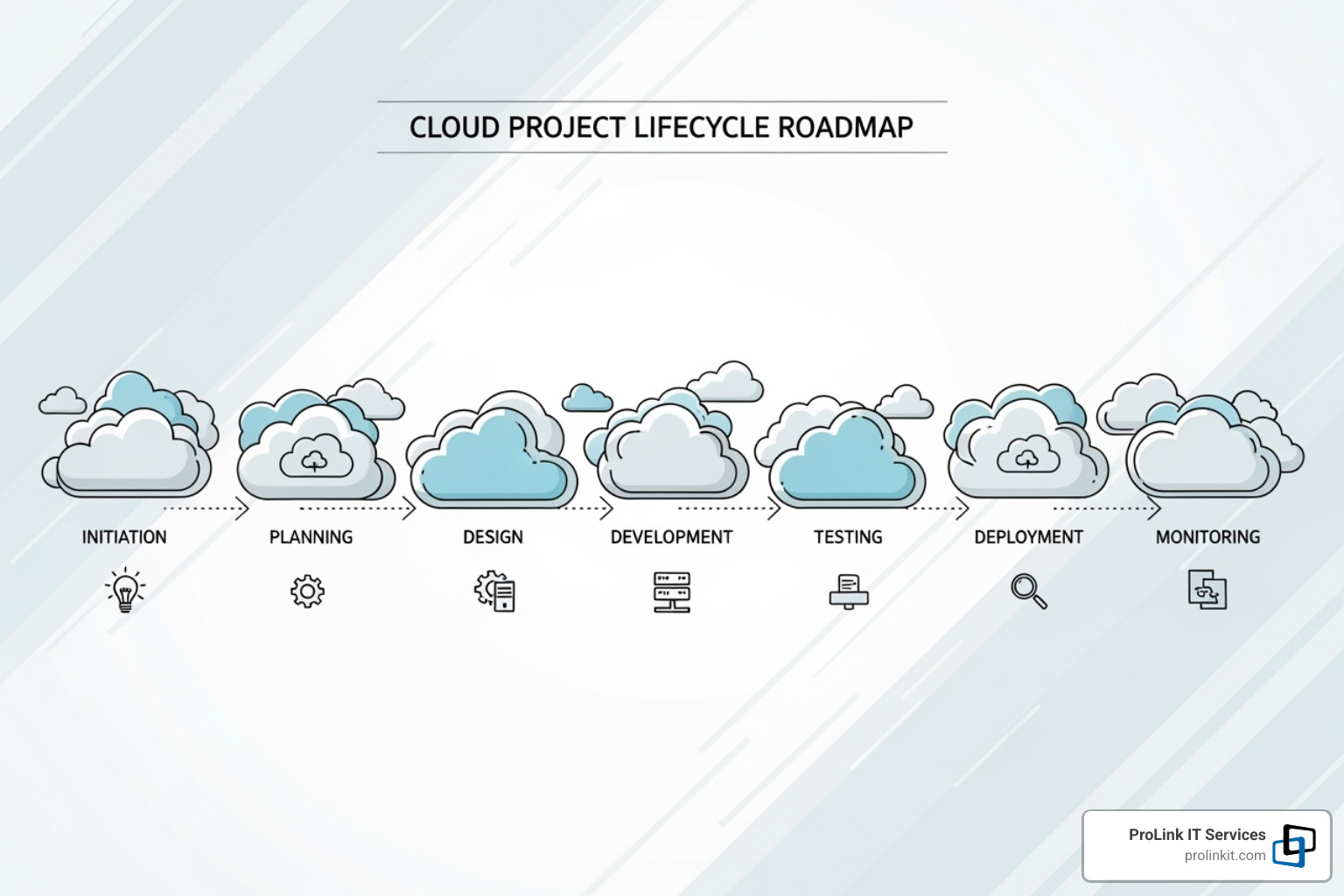
Phase 1: Initiation and Planning
This foundational phase answers the fundamental questions that guide the project.
- Define clear objectives: Articulate specific, measurable goals, such as reducing IT costs by 30% or improving application performance.
- Identify stakeholders: Look beyond IT and executives to include compliance officers, end-users, and customers.
- Define scope: Draw clear boundaries for what is and isn’t included to prevent scope creep.
- Assess risks: Identify potential problems, like migration issues or security vulnerabilities, and create backup plans.
- Plan resources: Determine the team, tools, and budget required, including cloud fees, training, and potential downtime costs.
Phase 2: Design and Implementation
This phase turns your vision into a technical reality.
- Design architecture: Create a blueprint for how services will connect, data will flow, and the system will scale.
- Select cloud services: Choose the right tools from providers based on your architecture, budget, and strategic goals.
- Set up the environment: Configure virtual networks, security groups, and access controls, often using Infrastructure as Code for reliability.
- Configure security: Implement identity management, encrypt data, and establish network security policies.
- Deploy: Bring applications and services online, using CI/CD pipelines to automate the process and reduce errors.
For complex implementations that require specialized expertise, consider our Get help from our Expert IT Consultancy Services.
Phase 3: Execution, Monitoring, and Closure
The final phase ensures long-term success and continuous improvement.
- Migrate data: Carefully orchestrate data transfer to maintain integrity and minimize downtime.
- Train users: Provide comprehensive training to end-users and IT staff to ensure adoption and effective use of the new system.
- Monitor performance: Use real-time tools to track resource utilization, application performance, and costs to spot issues early.
- Conduct security audits: Perform regular assessments to ensure the environment remains secure and compliant.
- Close the project: Complete all documentation, conduct a “lessons learned” session, and ensure a smooth handover to operational teams.
Overcoming Common Challenges in cloud computing project management
Anticipating common obstacles is key to a successful cloud project.
- Data security and privacy concerns: Address these with robust governance frameworks, strong encryption, multi-factor authentication, and regular security audits. Properly configured cloud platforms are often more secure than on-premise setups.
- Multi-cloud complexity: When using multiple providers, maintain consistency with Infrastructure as Code and use unified monitoring tools for a single view of your entire cloud footprint.
- Cost overruns: The pay-as-you-go model requires careful management. Implement effective FinOps practices, including continuous cost monitoring, optimization strategies like rightsizing, and chargeback models to promote cost awareness.
Frequently Asked Questions about Cloud Project Management
We often get questions from business leaders curious about moving to cloud-based project management. Here are answers to the most common ones.
What’s the main difference between cloud and traditional project management?
The biggest differences are accessibility, real-time collaboration, and scalability. Traditional project management tied data to physical servers or computers, creating bottlenecks and version control issues. Cloud computing project management centralizes all project data, making the same up-to-date information accessible to the entire team from anywhere. This supports agile, iterative workflows and allows resources to be scaled instantly as project needs change.
Do I need to be a cloud engineer to manage a cloud project?
No, but you do need to understand the basics. A foundational knowledge of cloud computing project management concepts—like the differences between IaaS, PaaS, and SaaS, and the offerings of major providers like AWS, Azure, and Google Cloud—is crucial. This knowledge helps you make effective decisions, communicate with your technical team, and anticipate challenges. Your role is to orchestrate the project and align it with business goals, while your cloud engineers handle the technical implementation.
How do you ensure security in cloud-based project management?
Security is a multi-layered approach that can make cloud environments more secure than on-premise setups. Key components include:
- Identity and access management (IAM): This ensures people only have access to what they need for their role, enforced with methods like multi-factor authentication.
- Data encryption: This protects your information both in transit and at rest, rendering it useless to unauthorized parties.
- Regular compliance audits: Proactive audits help catch vulnerabilities and ensure you meet industry and regulatory standards.
Network security and continuous monitoring complete the picture, allowing for rapid response to potential threats. For expert help, partnering with a specialized provider can make all the difference. Learn more about how we can protect your projects with our Cloud Security Managed Services.
Conclusion
Cloud computing project management is more than a tech upgrade; it’s the backbone of modern business operations. It breaks down geographical and time-zone barriers, allowing teams to collaborate seamlessly on real-time data.
The financial benefits are clear. Shifting from hardware investments to flexible pay-as-you-use models frees up capital and ensures you only pay for what you need. Enterprise-grade security features also provide peace of mind.
Choosing the right methodology—whether Waterfall, Agile, or a Hybrid model—is critical for success and depends on your organization’s needs. For project managers, success requires a blend of technical knowledge, financial acumen, and a commitment to learning.
The step-by-step approach we’ve outlined provides a roadmap for your cloud journey, from careful planning and design through implementation and closure.
As a veteran-owned business, ProLink IT brings the same discipline and integrity that served us in the military to every client partnership. We understand that your success is our mission, and we’re committed to helping you steer the cloud landscape with confidence and expertise.
Ready to transform how your organization manages projects? Let us help you steer your cloud journey with our expert Cloud Managed Services. Your team—and your bottom line—will thank you for making the move to the cloud.